Globalize Dates and Times in Django
From Flatter-Than-a-Pancake Kansas
Django's default date and time formats, from django.conf.locale.en.formats, reflect
its Lawrence, Kansas roots:
| Name | Django Format String | Sample | Comments |
|---|---|---|---|
DATE_FORMAT |
N j, Y |
April 29, 2026 |
Unambiguous, no time zone, months are language-specific, width varies |
SHORT_DATE_FORMAT |
m/d/Y |
04/29/2026 |
Ambiguous, no time zone |
TIME_FORMAT |
P |
2:30 p.m. |
Unambiguous, no time zone, slightly verbose, width varies |
DATETIME_FORMAT |
N j, Y, P |
April 29, 2026, 2:30 p.m. |
Combine above |
SHORT_DATETIME_FORMAT |
m/d/Y P |
04/29/2026 2:30 p.m. |
Combine above |
Around the Whole Globe
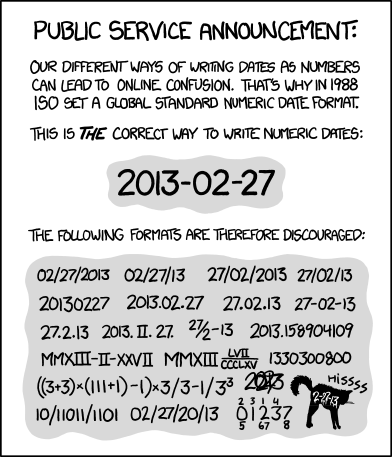
The target is RFC 3339, a profile
of ISO 8601 that uses a space between date
and time instead of the T separator. The space is easier to read: 2026-04-29 14:30 Z
vs 2026-04-29T14:30:00Z. With globalized settings:
| Name | Django Format String | Sample |
|---|---|---|
DATE_FORMAT |
Y-m-d \Z |
2026-04-29 Z |
SHORT_DATE_FORMAT |
Y-m-d \Z |
2026-04-29 Z |
TIME_FORMAT |
H:i \Z |
14:30 Z |
DATETIME_FORMAT |
Y-m-d H:i \Z |
2026-04-29 14:30 Z |
SHORT_DATETIME_FORMAT |
Y-m-d H:i \Z |
2026-04-29 14:30 Z |
Putting a timezone on a bare date is basically unheard of. But consider two people looking at the same date string:
| Viewer | Offset | Their interpretation | UTC span |
|---|---|---|---|
| Reader in California (PDT) | UTC-7 | Apr 29, midnight to midnight Pacific | 2026-04-29T07:00Z to 2026-04-30T06:59Z |
| Writer in India (IST) | UTC+5:30 | Apr 29, midnight to midnight IST | 2026-04-28T18:30Z to 2026-04-29T18:29Z |
Their interpretations differ by 12 hours 30 minutes. In the worst case--a UTC-12 reader and a UTC+14 writer--the same date spans a 50-hour ambiguity window.
Writing America/Los_Angeles or EST5EDT next to every date would be
unwieldy. But Z--two characters including the space--tells the reader this
date is UTC, narrowing the ambiguity window from 50 hours to 24. For internal
systems that already run on UTC, the burden is zero.
This is globalization: one format, everywhere, no locale adaptation.
Django's USE_I18N setting controls string translation, not date formatting. The setting
that controls whether formats adapt to the user's locale was historically USE_L10N, for
"localization." Django 5.0 removed USE_L10N. The replacement is FORMAT_MODULE_PATH.
Here is how to configure RFC 3339 datetimes across Django versions.
The goal
Display datetimes like 2026-04-29 14:30 Z everywhere:
- 24-hour time
- Explicit
Ztimezone suffix - No locale adaptation -- every user, every page, every format
Django 3.x and 4.x
Set USE_L10N = False. Django then uses the format strings from config/settings.py directly,
without consulting locale modules. USE_L10N is
deprecated in 4.x
but still works.
These are Python strftime format strings. The Z is a literal character.
Django 5.x and 6.x
USE_L10N is removed. The settings-level DATETIME_FORMAT strings are ignored because
Django's built-in locale formats take priority -- even with USE_I18N = False.
Django resolves format strings by checking modules in FORMAT_MODULE_PATH before falling
back to the built-in django.conf.locale.en.formats. We register our own module to override
the defaults.
Create a format module at config/formats/z/formats.py:
Format modules use Django's own template-tag format syntax, not Python strftime.
The equivalent of %Y-%m-%d %H:%M Z is Y-m-d H:i \Z (backslash-escaped Z literal).
Point Django at the module:
How Django resolves formats
When code calls formats.get_format('DATETIME_FORMAT'), Django follows this path:
- If locale formatting is enabled, check each module returned by
get_format_modules() - Modules are searched in order:
FORMAT_MODULE_PATHfirst, then built-in locale modules - If a module defines the requested format, use that value
- Otherwise fall back to the value from
config/settings.py
With FORMAT_MODULE_PATH = 'config.formats', our module is checked before
django.conf.locale.en.formats, so our RFC 3339 format wins.
What about USE_I18N?
USE_I18N controls Django's translation machinery of gettext, {% translate %},
language-prefixed URLs, and so on. It does not control date formatting. You can set
USE_I18N = True (to translate strings) while still using RFC 3339 datetimes via
FORMAT_MODULE_PATH. The two are independent.
Setting USE_I18N = False is still useful: it avoids loading translation catalogs at
startup and prevents Django from looking for locale-specific format modules that do not
exist. It also shuts off the admin's language-preference UI.